

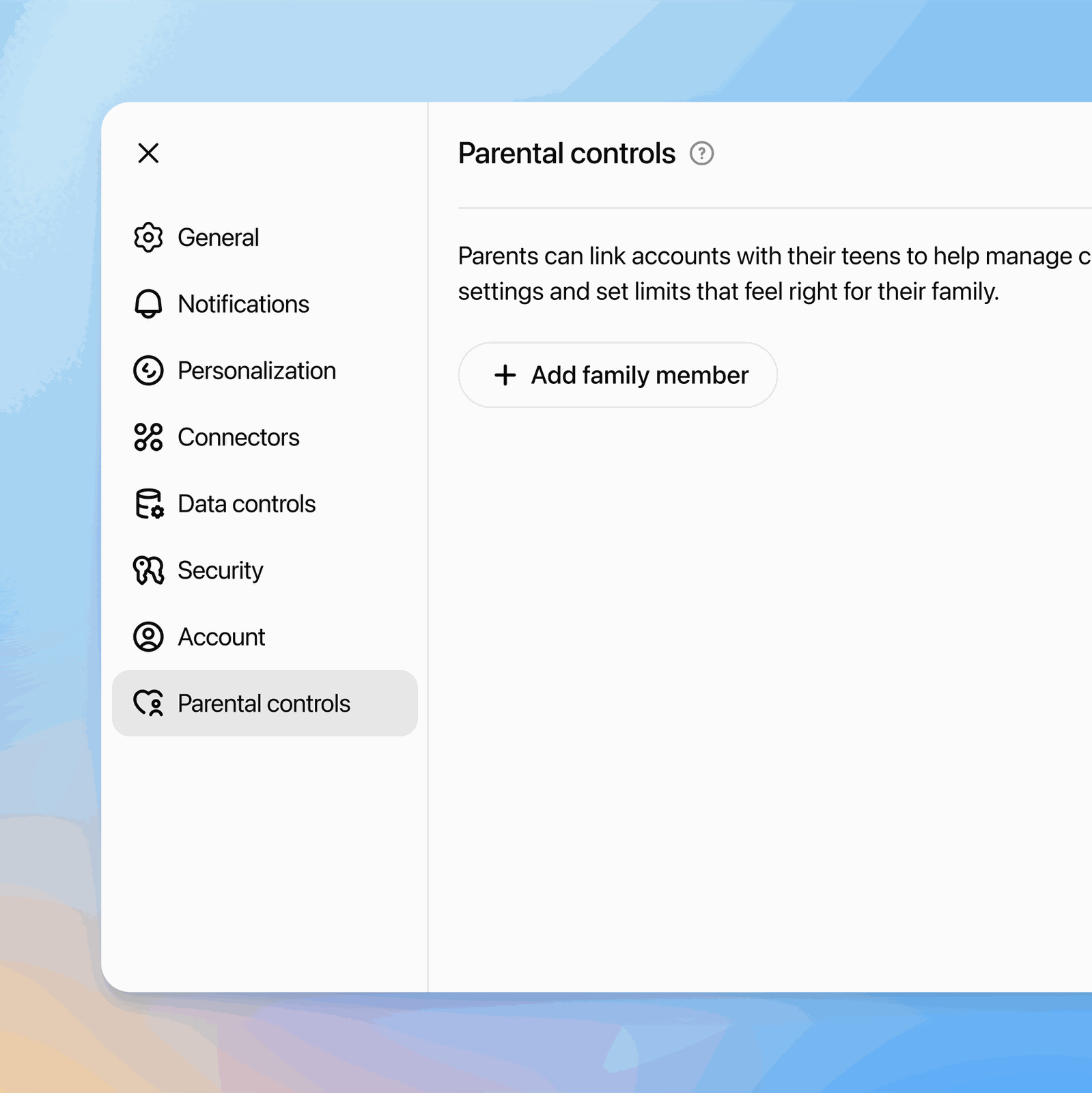
ChatGPT's parental controls are switched on from the parent's account, under Settings > Parental controls > Add family member. Once the teen accepts the invite from their own account, the parent can block ChatGPT during set hours, turn off Voice Mode, image generation and memory, and keep the teen's chats out of OpenAI's model training. Parents cannot read those chats. According to OpenAI's help center, they only hear from OpenAI when there is a serious safety concern, such as signs that a teen may harm themselves.
OpenAI launched the controls on September 29, 2025, and has added to them since. How ChatGPT treats minors is now also a legal fight, with Texas suing OpenAI and Sam Altman.
Before you start
Parent and teen each need their own ChatGPT account, because the feature links two existing accounts. One parent can link several teens, but each teen can be linked to only one parent or guardian at a time.
The settings belong to the teen's account, much like PlayStation's parental controls, so they follow your kid to any phone, laptop or browser where they sign in. By the same logic, which is our inference, they do nothing for a second account your teen sets up, or for ChatGPT used while logged out.
OpenAI's terms of use set the minimum age at 13, or higher where local law requires it, and say anyone under 18 needs a parent's or guardian's permission. Its age guidance page states plainly that ChatGPT is not meant for children under 13.
How to link your teen's account
OpenAI's instructions are written for the web version at chatgpt.com. From the parent's account:
1. Open your profile menu and go to Settings. 2. Choose Parental controls, then Add family member. 3. Pick Use phone or Use email and enter your teen's number or address. 4. Select Send. 5. Your teen accepts through the text, the email or the notification inside ChatGPT.
After that, your teen shows up under Family members in the same menu. Tap their name to open their settings.
Teens can start the process too. In their own account they go to Settings > Parental controls > Invite a parent and enter the parent's phone or email. If the parent already sent an invite, the same menu shows an Accept invite button.
The settings parents control
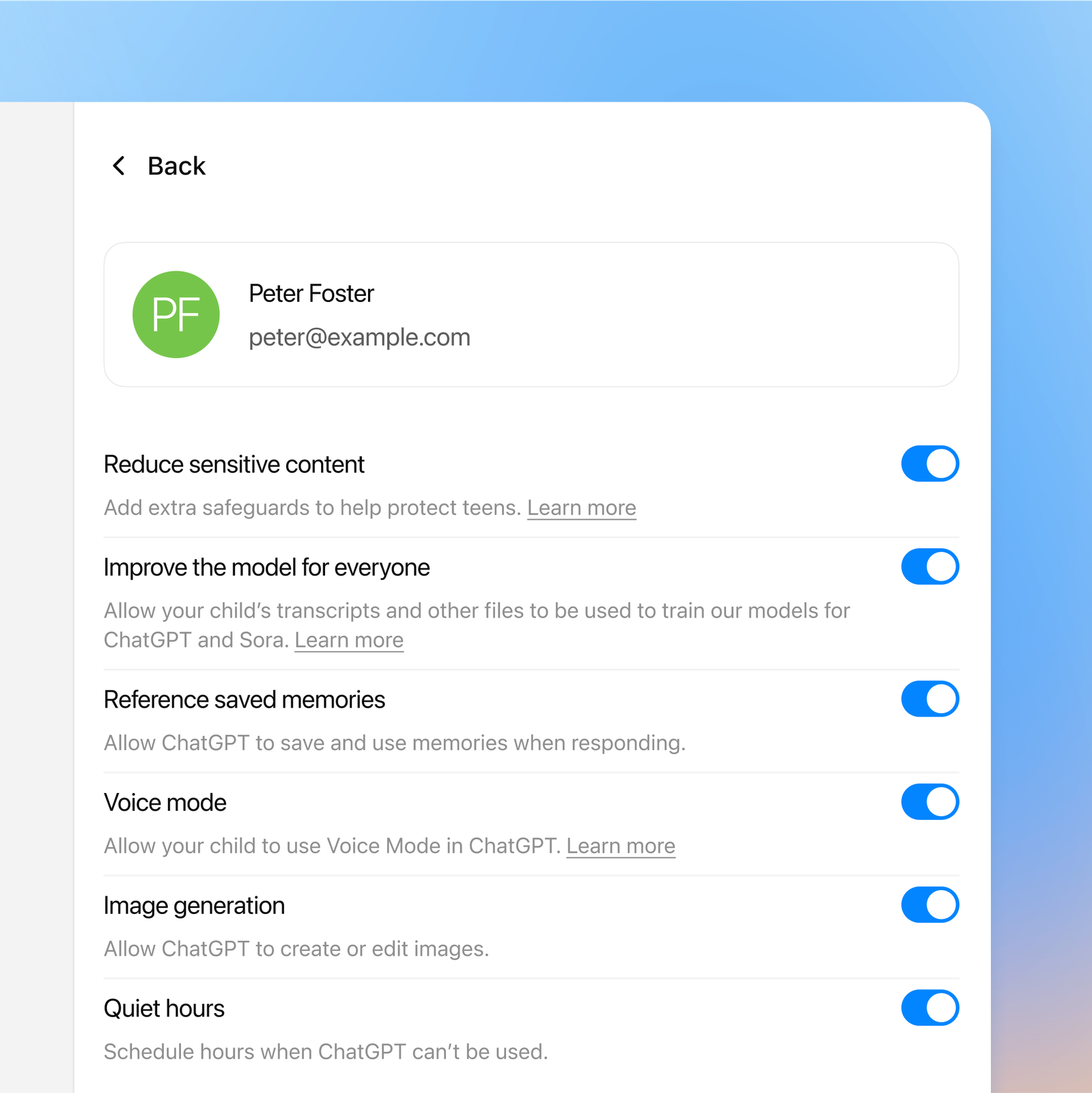
Most switches start in the on position. If you link the accounts and change nothing, your teen keeps every feature, and the only change is that the sensitive-content filter switches on. Here is what each setting does when you change it:
- Quiet hours (off by default): sets times when your teen can't use ChatGPT at all. You can add several blocks, say one overnight and one for school hours. - Voice Mode (on): turn it off and your teen can't talk to ChatGPT out loud. - Image generation (on): turn it off and ChatGPT won't create or edit images on that account. - Reference saved memories (on where available): turn it off and ChatGPT stops using what it saved from past chats to tailor its answers. - Improve the model for everyone (on): turn it off and OpenAI won't use your teen's conversations to train its models. - Study mode and Study hours (off): the first makes new chats open in study mode, the second does so only during a schedule you pick. - Codex network access and Cloud browser (on): these only matter for ChatGPT Work, the part of ChatGPT that carries out tasks on its own. One decides whether code it runs can reach the internet, the other whether it can browse public websites.
Study mode holds back the full answer. It breaks a problem into steps and uses questions and hints so the student works it out. Study hours don't lock anything, so your teen can still use ChatGPT normally, and they don't apply to GPTs or Projects.
Some changes only kick in for new conversations. Teens can see which controls apply to them but can't change them. Parents can also ask ChatGPT for a change inside a conversation and confirm it with Allow or Deny, except for the two schedules, which can only be edited under Parental controls.
Turning off model training here only covers your teen. To do the same for your own account, or for Gemini and Claude, see our guide on how to stop ChatGPT, Gemini and Claude from training on your chats.
What turns on automatically
Linking the accounts switches on Reduce sensitive content. ChatGPT then cuts back graphic content, viral challenges, sexual, romantic or violent role-play and extreme beauty ideals. Teens can't turn it off. Parents can, but that removes only this filter, and the account still gets every other teen protection.
In its launch post, OpenAI admits that someone determined to get around these guardrails can do it. OpenAI's age prediction page adds that accounts treated as teen accounts don't see ads.
What parents can and can't see
Parents get no view into conversations, chat history or real-time activity, and OpenAI support won't hand over transcripts either. What they do get are safety notifications, on by default once the accounts are linked, in these situations:
- trained reviewers confirm a serious self-harm concern - signs of disordered eating show up, in regular chats only, not in ChatGPT Work or Codex - OpenAI deactivates the teen's account over violent conduct, an alert added on July 13, 2026 - the teen unlinks the accounts
Alerts arrive by email, text or push notification, and you choose the channels under Safety notifications > Manage notifications. Each one gives a short description of the concern and links to support resources, never excerpts from the chat. OpenAI warns that some alerts will turn out to be false alarms, and that the system doesn't watch chats in real time or replace emergency services.
If you get one, OpenAI suggests checking in with your teen, asking whether they're safe right now, listening without judgment and helping them reach a professional. In the US, call or text 988 to reach the Suicide & Crisis Lifeline, or 911 if there's immediate danger.
Age prediction and verification
ChatGPT can put an account into the teen experience even if no parent ever linked it. Since January 2026, an OpenAI model has estimated whether a user is under 18 from signals such as how old the account is, what time of day it's used, usage patterns, the general topics discussed and the age the user gave. When it decides the user is a minor, or isn't sure, the teen protections apply. The rollout reached the European Union on August 25, 2026, according to OpenAI.
Age prediction only turns on the teen protections. Quiet hours, the other switches and parent alerts still require linked accounts.
Adults flagged as teens by mistake can prove their age under Settings > Account > Age > Verify age, or at chatgpt.com/verify_age. A third-party service called Persona runs the check with a live selfie, a government ID or both, depending on the country. OpenAI's verification help page says Persona deletes the images within seven days and OpenAI only learns the date of birth and whether the person is 18 or older.
Unlinking and turning 18
Either side can select Unlink accounts at any time. If the teen does it, the parent gets a notification, and from then on loses both the settings and the safety alerts.
When the teen turns 18, ChatGPT notifies both of them and the link ends on its own. Teen protections come off and the account holder takes over every setting. Everything else stays where it was, so if training or memory were switched off, they remain off until the new adult changes them.
The conversation starts here
Sign in with a supporter account to comment. Sign in



Nobody has commented yet. Want to go first?