

If you use ChatGPT, Gemini or Claude with a personal account, your conversations can be used to improve their models until you change a setting. Each service keeps that switch in a different place:
ChatGPT. Settings > Data controls > turn off "Improve the model for everyone."
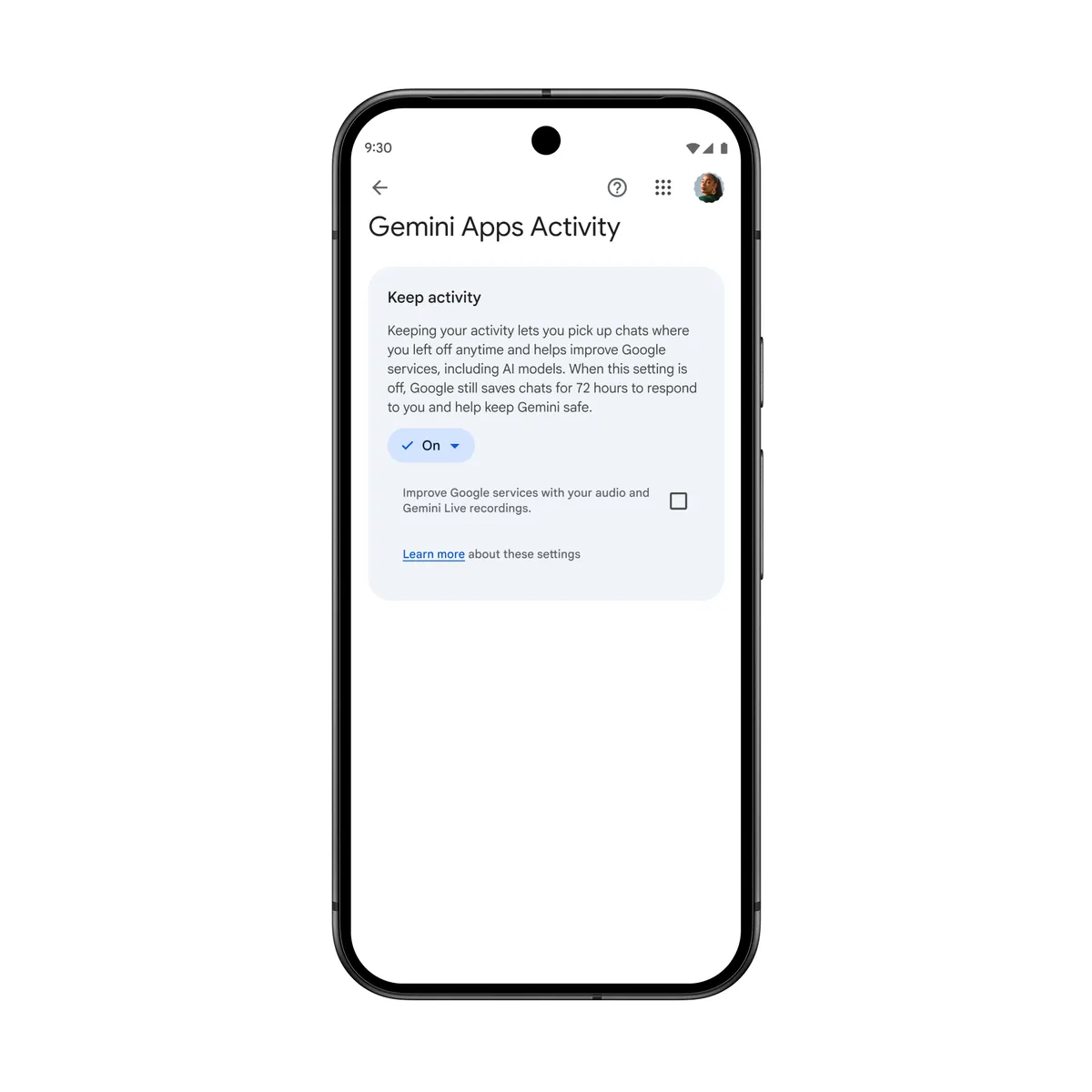
Gemini. Settings & help > Activity > tap the control showing it is on and choose to turn it off.
Claude. Settings > Privacy > turn off the model improvement toggle.
Flipping the switch does not empty your history, and each company still keeps a copy for a while. On all three services, one habit overrides it for a given conversation: rating a response with a thumbs up or thumbs down can send that whole conversation into training anyway.
Menu names below come from each company's English help pages. They can shift between app versions.
Training, storage and trackers are separate questions
Training means a company uses real conversations as examples when it builds the next version of its model. Some of them may first be read and labeled by people, which is how the system learns what a good or inappropriate answer looks like. The toggle on each service decides whether your new chats go into that pipeline.
Storage is different. Your history stays in your account until you delete it, and the company keeps internal copies to catch abuse, meet legal obligations or, in Gemini's case, simply answer you. Those copies follow their own clocks, listed service by service below.
Third-party trackers are outside this setting too. The websites and apps of these assistants load code from other companies that can receive a chat's title or link. Researchers at IMDEA Networks and Carlos III University of Madrid measured it across nine chatbots, and we cover which chat details reach trackers and how to limit them.
ChatGPT: Improve the model for everyone
On the web, open your account menu, go to Settings, then Data controls, switch off "Improve the model for everyone" and select Done. On iPhone and Android, open the sidebar, tap your profile icon and follow the same path. When you are signed in, the choice follows you to every device. Signed out, it only applies to that browser.
OpenAI's help page says new conversations stop being used for training but still show up in your history. Archiving a chat changes nothing here. To remove content you have to delete chats or the account. A deleted chat disappears from view right away, and OpenAI schedules it for permanent deletion within 30 days unless security or legal obligations require keeping it longer.
A thumbs up or down lets OpenAI use the entire conversation for training even after you opt out. Authorized OpenAI staff can also access content to investigate abuse, handle support or deal with legal matters. Opting out does not change that access.
You can get the same result by submitting "Do not train on my content" through OpenAI's Privacy Portal. Either route is enough, and on personal plans it also covers Codex tasks.
For a one-off question, Temporary Chat keeps the conversation out of history and out of training, although OpenAI may hold a copy for up to 30 days for safety.
Free, Plus and Pro train by default. ChatGPT Business, Enterprise, Edu and the API do not use your content for training unless the organization opts in. In those workspaces the admin is in charge, and you may not be able to change the setting yourself.
Gemini: Keep Activity
On a computer, go to gemini.google.com, open Settings & help and choose Activity. Near the top, select the control that shows it is on, then pick Turn off or Turn off and delete activity. On iPhone or iPad, tap Menu, your profile picture, then Gemini Apps Activity. Google keeps a separate help page for Android.
With the setting off, Google says future chats stay out of your activity and are not used to train models unless you send feedback. They are still kept with your account for 72 hours so Gemini can respond and process that feedback. You do lose features, including some connected apps such as Google Workspace and tasks Gemini runs in a remote browser.
Human review is the part to act on early. While the setting is on, reviewers read a sample of chats that have been disconnected from your account, and Google keeps those reviewed chats for up to three years. Deleting your activity later does not remove them, so switch it off before you type something sensitive.
With the setting on, activity auto-deletes after 18 months by default. You can change that to 3 or 36 months, or turn auto-delete off. Photos and videos you upload can be reviewed by people as well, while audio and Gemini Live recordings are not used to improve the service unless you enable that option.
For a single private question, click Temporary chat next to New chat. It stays out of your activity, is not used for training and is kept for 72 hours. It only exists on personal accounts.
A Google AI Pro or Ultra subscription is not listed as an exception, so the same rules apply to any personal account. Work and school accounts are different. Google says chats there are not read by reviewers or used for training without permission, and the admin sets how long they are kept.
Claude: Settings > Privacy
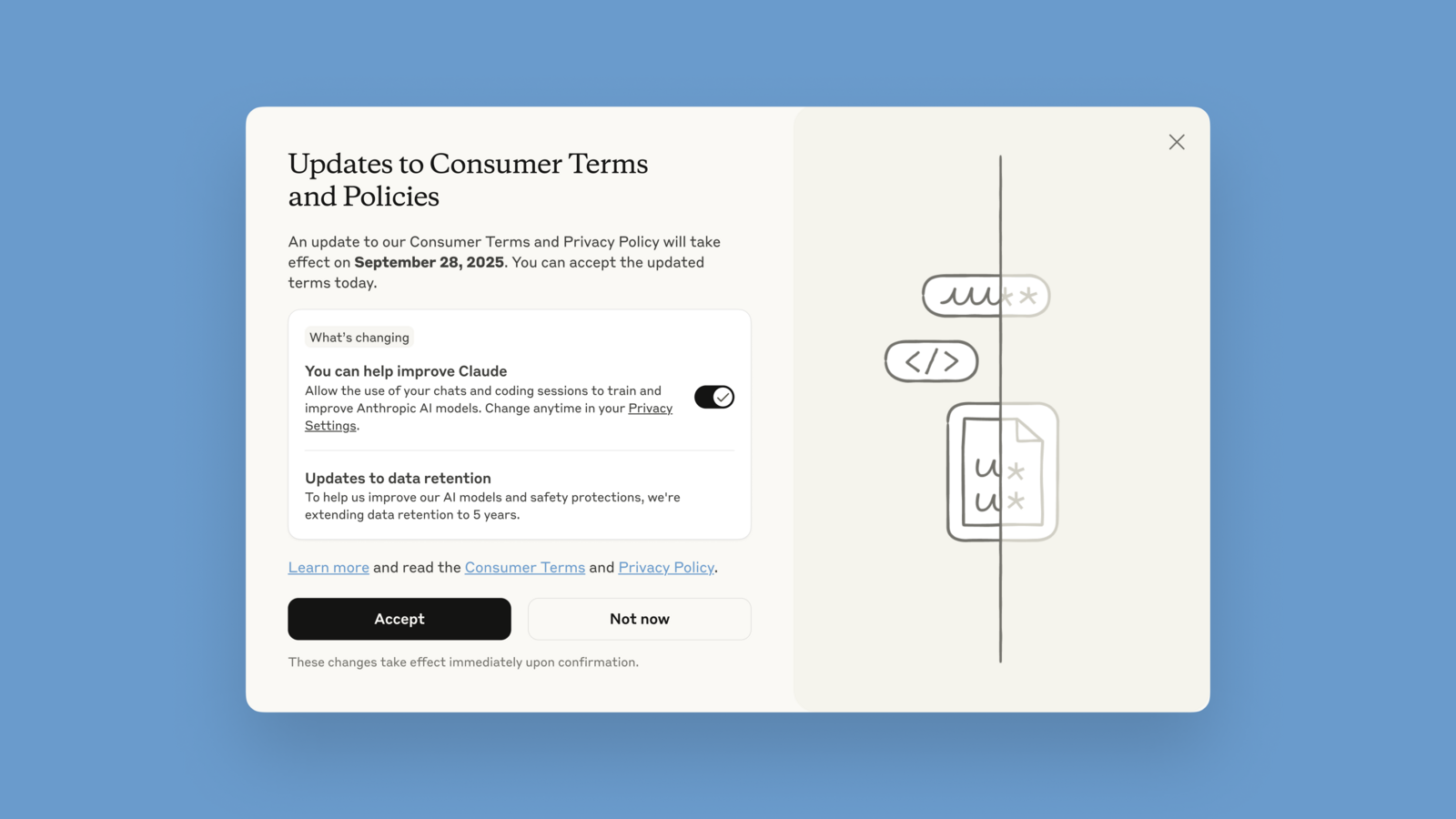
On the web or desktop app, click your name, open Settings, then Privacy. Anthropic's help page places the toggle under "Help Improve our AI models." The mobile path is the same, or you can go straight to claude.ai/settings/data-privacy-controls.
Anthropic asked every user to make this choice in 2025, through a pop-up that showed the toggle switched on. If you clicked Accept without looking, it is probably still on. It applies to Free, Pro and Max, including Claude Code used with those plans.
With the setting on, Anthropic can keep new or resumed chats for up to five years in de-identified form for training. With it off, the 30-day retention period applies. Turning it off also stops Claude from using your stored chats in future training runs, but anything already in a run that has started, or in a finished model, stays there.
Two exceptions remain. Chats flagged by safety classifiers can be used to improve those classifiers and are kept for up to two years. A thumbs up or down stores the full conversation for five years and allows its use in training.
Claude's version of a temporary chat is incognito mode, the ghost icon in the top right of a new chat. It skips history and memory and is never used for training, though Anthropic keeps it for 30 days. It works on every plan, but not inside Projects, and it cannot be turned into a regular chat later.
Claude Team, Enterprise, the API, Claude Gov and Claude for Education do not train on your data by default. Shared links are a separate risk with a separate fix, which we covered in how to find and remove shared Claude chats that appeared in Google.
Copilot and Meta AI
Microsoft Copilot. On copilot.com, select your profile icon, your name and Privacy. There are two toggles, Training on conversation activity and Training on voice conversations. In the Windows or Mac app the path runs through Settings, and on mobile through Account. Microsoft says the change can take up to 30 days to apply and that conversation history is kept for 18 months unless you delete it. Microsoft does not train on conversations when you are signed out, signed in with a work account or using Copilot inside Microsoft 365 Personal or Family.
Meta AI. Meta says questions you ask Meta AI are used to train its models, and it does not offer this as a toggle inside the chat. The objection form it announced covers people in the European Union. Private messages with friends and family stay out, unless you or someone in the chat shares them with Meta AI.
How to check that it worked
Open the setting again on a second device signed in to the same account. On ChatGPT, Gemini and Claude the switch should show as off there too, because the choice is stored with the account rather than the phone. Gemini offers one more test: open myactivity.google.com/product/gemini, send a new message and confirm it does not appear in the list.
Repeat this for every account you use, personal and work, on every service. If the option is grayed out, an administrator controls it. On ChatGPT, a parent or guardian can also lock it on a linked teen account.
Then adjust a few habits. Skip the thumbs buttons in private conversations. Use Temporary Chat or incognito for sensitive questions, knowing the company still keeps a temporary copy. Delete chats you do not want kept, because archiving is not enough. And revoke shared links you no longer need, since deleting a shared Gemini chat does not remove its public link.
If you need your text to never leave your computer, no cloud setting can promise that. That is what on-device AI is for, and we compare the trade-offs in local AI vs. cloud AI.
The conversation starts here
Sign in with a supporter account to comment. Sign in



Nobody has commented yet. Want to go first?