

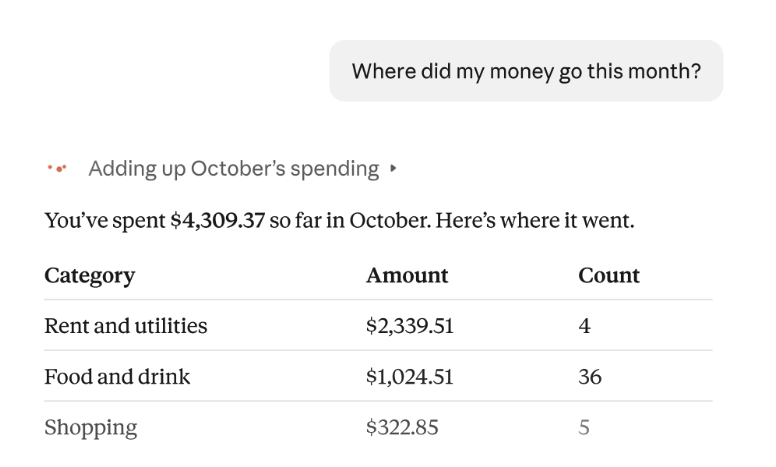
Anthropic has started rolling out Personal Finance, a section of Claude that connects to your bank accounts and answers questions using your actual transactions, such as "Where did my money go this month?" or "What's left before payday?" The company announced the beta on November 5, 2026 for Pro, Max and Ultra subscribers in the US. Claude can read the data, but it can't move, manage or invest money.
Because it's a gradual rollout, the option may not show up for everyone yet. Free, Team and Enterprise plans are excluded, so anyone who only uses Claude at work needs a personal paid plan.
How to turn it on
According to Anthropic's setup guide, it works on the web, the desktop app, iOS and Android. The bank connection runs through Plaid, a company that links apps to bank accounts:
1. Open Personal Finance in the side menu. If you don't see it, look under More. 2. Select Get started, pick your goals or skip that step, then choose Link accounts with Plaid. 3. Plaid opens. Choose your bank, sign in, and select the accounts you want to share. 4. Return to Claude and wait for the accounts to appear. You can add more with Link another account.
Plaid gives you 10 minutes to finish, so don't reload or close its window halfway through. You can link up to 16 banks.
What Claude can see
You type your bank password into Plaid's window, never into Claude, and approve read-only access. For each shared account, Claude then gets:
- Account details: the bank's name, the account's name and type, and its last four digits. - Balances: the current balance and, for cards, the credit limit. - Transactions: up to 24 months, with amount, date, merchant, category and the bank's description.
Credit cards, loans and investment accounts can be linked too, but for those Claude reads only balances and credit limits, not holdings, trades, rates or terms. Balances can lag the bank by a day or two.
What it does with the numbers
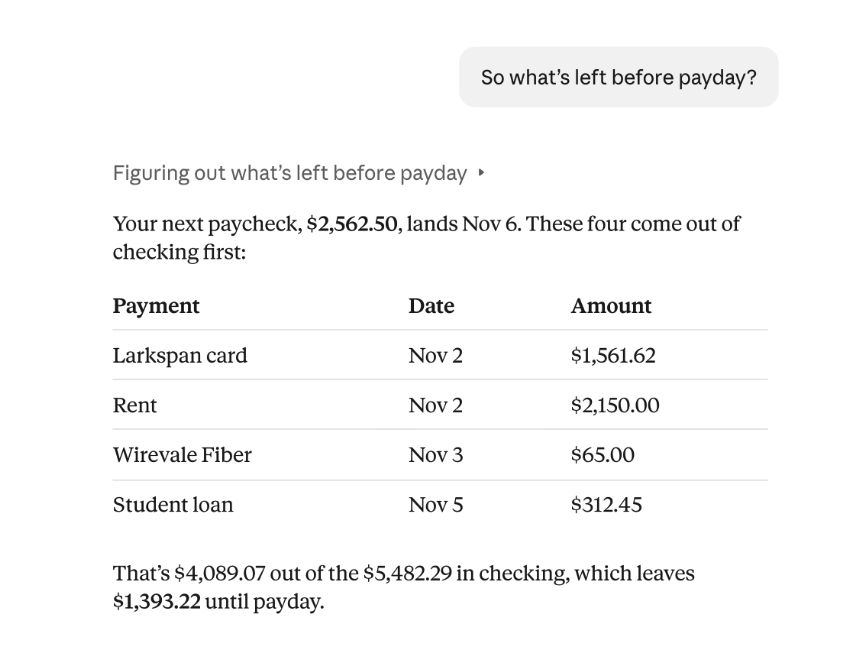
Claude sorts spending into categories, looks for duplicate charges and surprise fees, and builds charts, budgets or a bill calendar. In one of Anthropic's examples, it takes the four payments due before the next paycheck out of the checking balance and tells you how much is left until payday.
Anthropic says Claude can get numbers wrong and suggests asking which transactions sit behind a figure and checking anything important against your bank. It doesn't give investment advice, and there are no ads or sponsored card or loan offers.
What happens to your data
Anthropic says conversations inside the Personal Finance hub aren't used to train its models. Chats outside the hub follow your regular privacy settings, which our guide on stopping Claude from training on your chats walks through. Chats that use your accounts are also kept out of Claude's memory and out of chat search.
The figures do stay in the chat until you delete it. Unlinking a bank doesn't erase earlier answers, charts or shared links, and a shared chat shows the amounts to anyone with the link, the same slip that once put Claude conversations in Google results. The companies that host Claude also handle the bank data, and Plaid treats it under its own privacy policy.
The weakest point is your Claude login. Anyone who gets into the account can ask about your spending without touching the bank, and malware has already been caught stealing Claude sessions without the password. If you link a bank, secure Claude the way you'd secure your bank app. To cut access, unlink the bank from Personal Finance or revoke it at my.plaid.com.
Outside the US
Only US banks are supported. Open Claude from another country, VPN included, and the section disappears until you're back, although linked banks stay linked. Plaid also operates in parts of Europe, including Spain, France and Ireland, but Anthropic hasn't said whether Personal Finance will follow, and Plaid's own post describes it as a feature for US consumers.
Frequently asked questions
What is Claude Personal Finance?
It's a beta section of Claude, launched on November 5, 2026, that links to your bank accounts through Plaid and answers questions about spending, balances and bills using your real transactions. It can build charts and bill calendars, but it can't move money or give investment advice.
Who can use Claude Personal Finance?
Pro, Max and Ultra subscribers in the US with US bank accounts, on the web, desktop, iOS and Android. Free, Team and Enterprise plans don't get it. The rollout is gradual, so the option may take a while to appear on your account.
Can Claude make payments or transfers from my account?
No. Access is read-only: Claude sees balances, credit limits and up to 24 months of transactions, but it can't move, manage or invest money. It never sees your bank password either, since you only type that into Plaid's window.
Does Anthropic train Claude on my bank data?
Anthropic says chats inside the Personal Finance hub aren't used for training, while chats outside it follow your privacy settings. The data does stay in your chat history until you delete it, and Plaid handles it under its own privacy policy.
How do I disconnect my bank from Claude?
In Personal Finance, open your linked accounts, pick the bank and choose Unlink. That removes every account tied to that bank login. You can also revoke access at my.plaid.com. Earlier answers, charts and shared links stay until you delete them.
The conversation starts here
Sign in with a supporter account to comment. Sign in

Nobody has commented yet. Want to go first?