
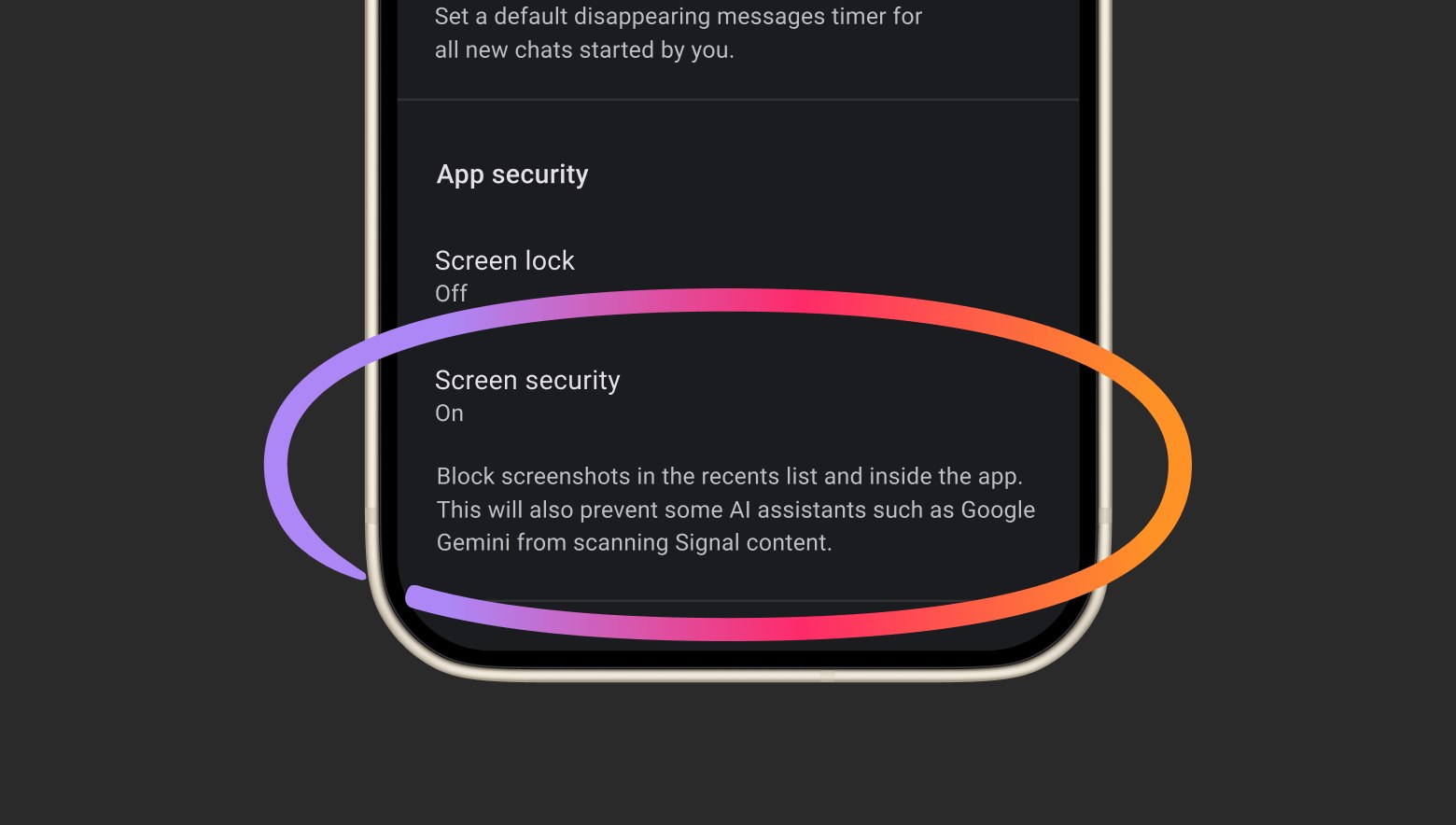
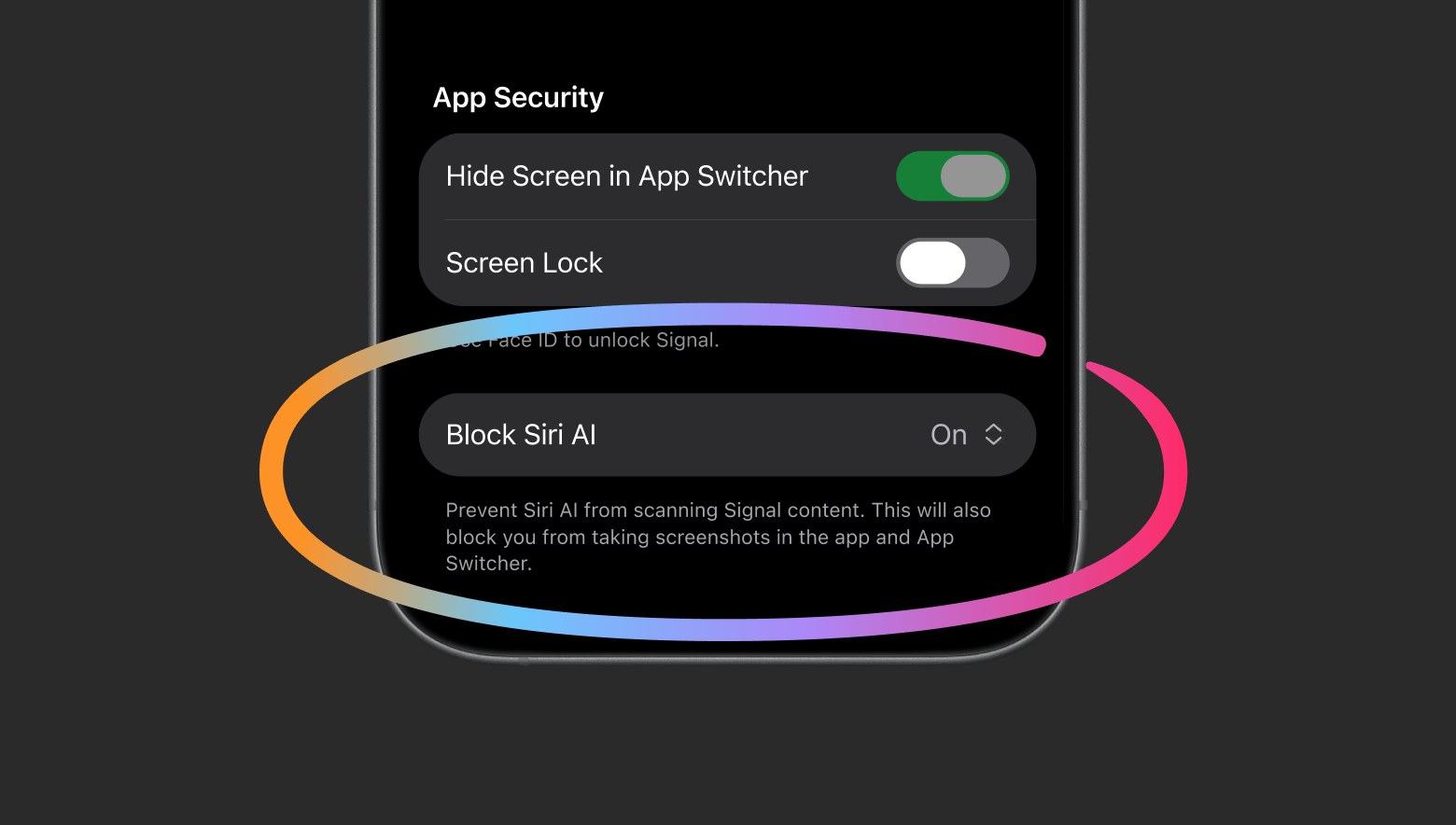
Signal is blocking screenshots inside its app so AI assistants built into the operating system, like Siri AI, the new Siri in iOS 27, and Gemini on Android, can't read your conversations. Signal president Meredith Whittaker announced the change on the company's blog on Friday, Nov. 20. On an iPhone, the setting is called Block Siri AI and is on by default. On Android, Signal switches on its Screen security option by itself when it detects an assistant trying to read the screen. The trade-off is that you can't screenshot your own chats while it's on, and Signal's preview in the app switcher is hidden.
Siri AI and Gemini can answer questions about whatever is on your screen, and Signal says most of these assistants read other apps by capturing the screen. An app that can't be captured leaves them nothing to read. End-to-end encryption can't help here, because it protects a message in transit and the message is already decrypted on your display. Whatever an assistant takes ends up in its own database or servers, out of Signal's control.
The announcement came two days after Reuters reported that Muse, Meta's AI agent, which can operate apps on a user's behalf, read Signal messages on an Android phone and a Mac.
How it works on iPhone, Android, Mac and Windows
The protection differs by platform, and Macs don't get it at all.
- iPhone with iOS 27. Block Siri AI stops screenshots inside Signal, which keeps Siri AI's onscreen awareness away from your chats. Siri AI runs on the iPhone 15 Pro and Pro Max and every iPhone 16 or later, according to Apple's iOS 27 release notes.
- Android. Signal doesn't block screenshots up front, because on many phones it can't tell when the block has made a screenshot fail, so users would just see an unexplained error. Instead, it turns on Screen security only when it detects an assistant trying to read the screen. Signal admits this doesn't work on every phone and hasn't published a list of models.
- Mac. There's no block. Signal says Apple offers no documented way to prevent screenshots on macOS, and its newer screen protections only cover DRM video, the copy protection streaming services use. Its advice is to exclude Signal from Siri.
- Windows 11. Signal Desktop has blocked screenshots by default since May 2025, as Signal's help page notes, to keep out Recall, the Microsoft feature that snaps the screen every few seconds.
What the block doesn't stop
Signal concedes that its fix "is also incomplete," because stopping screenshots leaves other routes open. An agent can still read files already stored on a phone or computer. It can also read notifications. If an alert shows the message text, Android hands that text to any app with notification access. That's how Muse pulled Signal messages on the Android phone in Reuters' tests, without a single screenshot.
Signal wants Apple, Google and Microsoft to give apps a documented way to opt out of AI access, covering the screen, files and notifications. It's also asking for tools to rein in agents like Muse that get in through accessibility permissions, which exist so people with disabilities can have software operate the device for them.
What to check on your phone and computer
A few settings close some of the gaps the block leaves open.
- Signal's setting. Update the app, tap your profile photo (then Settings on an iPhone) and open Privacy. On Android you can turn on Screen security yourself instead of waiting for Signal to detect an assistant. If you switch the protection off to take screenshots, Signal warns that your messages and your contacts' could be exposed to AI agents.
- Siri on your iPhone. iOS 27.2 added an Excluded Apps list under Settings, then Siri. Add Signal and Siri AI can no longer read it, according to the Electronic Frontier Foundation.
- Notifications. In Signal, open Notifications and under Show pick Name only or No name or message (No Name or Content on an iPhone). Alerts stop carrying the text Muse read.
- Your Mac. Open System Settings, go to Siri and add Signal to the excluded apps.
- Any AI agent. Grant only the permissions a task needs and remove them when you're done, as our guide to reviewing and revoking an AI agent's permissions explains.
The conversation starts here
Sign in with a supporter account to comment. Sign in
Nobody has commented yet. Want to go first?